Sending data to the dashboard
This is the last Getting Started step: first install GPUFlight, then capture a local trace or start a monitor, then choose how the local NDJSON files reach the dashboard.
gpufl-client always writes telemetry to local NDJSON files (via
FileLogSink). What you choose is how those files get shipped to
the backend. The upload paths below share the same on-disk NDJSON
files as source of truth.
The main upload entry points are:
gpufl upload <log-dir>for post-run CLI upload.- Deferred upload APIs such as
gpufl::uploadLogs()andgpufl.upload_logs(...)for applications that call the SDK directly. gpufl monitor --uploadfor native foreground telemetry plus live agent upload.- Standalone
gpufl-agentfor deployed log tailing. - Browser upload from the dashboard when you already have a session folder.
The native upload paths can coexist on the same NDJSON files: they cooperate via the cursor file in the log directory.
remote_upload=Trueremote_upload=True and backend credentials on gpufl.init() were removed
in v1.2. New code should initialize profiling with gpufl.init(...), call
gpufl.shutdown(), then upload with gpufl.upload_logs(...) or use an
agent-based upload path.
Path 1: In-process deferred upload
After your GPU workload finishes and gpufl::shutdown() has returned,
call gpufl::uploadLogs(opts) (C++) or gpufl.upload_logs(...)
(Python). Backend credentials belong to the upload step, not to
gpufl.init().
The upload is never active during your workload. All network I/O happens after shutdown, so transient cert errors, TLS failures, and backend timeouts cannot affect the host process exit code or perceived performance.
Python — explicit deferred upload
import gpufl

ok = gpufl.init(
    app_name="train",
    log_path="/tmp/runs/train",
    continuous_system_sampling=True,
    system_sample_rate_ms=100,
)
try:
    # ... training, inference, whatever ...
    pass
finally:
    gpufl.shutdown()

if ok:
    result = gpufl.upload_logs(
        log_path="/tmp/runs/train",
        backend_url="https://api.gpuflight.com",
        api_key="gpfl_xxxxx",
    )
    print(f"Uploaded {result.events_uploaded} events "
          f"({result.bytes_uploaded / 1024 / 1024:.1f} MB) "
          f"in {result.elapsed_ms / 1000:.1f}s")
    if not result.success:
        for warning in result.warnings:
            print(f"  WARN: {warning}")
You can omit backend_url and api_key from upload_logs() when
GPUFL_BACKEND_URL and GPUFL_API_KEY are set in the environment.
If you skip the upload call entirely, the local NDJSON files remain on
disk for later upload via the CLI, browser, or agent.
C++
#include "gpufl/gpufl.hpp"
#include "gpufl/upload/upload_logs.hpp"

#include <cstdlib>
#include <iostream>

int main() {
    gpufl::InitOptions iopts;
    iopts.app_name = "train";
    iopts.log_path = "/tmp/runs/train";
    gpufl::init(iopts);

    // ... GPU work ...

    gpufl::shutdown();

    // Upload happens here, post-shutdown. Returns synchronously.
    gpufl::UploadOptions uopts;
    uopts.log_path = iopts.log_path;
    uopts.backend_url = "https://api.gpuflight.com";
    if (const char* key = std::getenv("GPUFL_API_KEY")) {
        uopts.api_key = key;
    }

    const auto result = gpufl::uploadLogs(uopts);
    if (!result.success) {
        for (const auto& w : result.warnings) {
            std::cerr << "[upload] " << w << "\n";
        }
    }
    return 0;
}
Set GPUFL_API_KEY before running this example, or populate
uopts.api_key from your own secret store. The C++ uploader uses the
UploadOptions values you pass it; the Python wrapper and CLI add the
GPUFL_BACKEND_URL / GPUFL_API_KEY environment-variable fallback.
CLI — gpufl upload
For post-mortem recovery of a session whose upload failed, or to upload a previously-offline run after the fact:
gpufl upload /tmp/runs/train \
    --backend-url=https://api.gpuflight.com \
    --api-key=gpfl_xxxxx
Exit codes:
| Exit | Meaning |
|---|---|
0 | All events uploaded successfully |
1 | Partial success — some warnings (printed to stderr) |
2 | Full failure — auth error, missing dir, total timeout, etc. |
Env vars GPUFL_BACKEND_URL and GPUFL_API_KEY are accepted in place
of the flags.
Session selection
A log directory may contain more than one session if the same
log_path was reused across runs. Three modes select which:
| Invocation | What gets uploaded |
|---|---|
gpufl upload <path> (no flags) | The latest session only — finds every job_start in the files, picks the one with the highest ts_ns, uploads only that. This is the default because the typical workflow is "I just ran a thing, ship it." |
gpufl upload <path> --session-id=<uuid> | Only that session. Errors if not present in any file. |
gpufl upload <path> --all-sessions | Every session in the directory, oldest first. Per-session lifecycle ordering — each session's job_start → batches → shutdown block ships intact before the next one starts. |
--session-id and --all-sessions are mutually exclusive.
Refusing accidental re-uploads (--force)
The cursor file (<logdir>/.gpufl-upload-cursor.json) records which
sessions completed a successful upload. By default:
- Default /
--session-idmode: refuses to re-upload a completed session. Exits with code 2 and a message likeSession 7f3a... was already uploaded on 2026-05-26T15:30:00Z (1234 events). Pass force=true (CLI: --force) to re-upload. --all-sessionsmode: silently skips completed sessions and uploads only the pending ones. Useful for backfilling a half-finished upload — re-run and it picks up where it left off.
Pass --force to override both behaviors and ship every selected
session regardless of the cursor.
# Re-upload a session you've already shipped
gpufl upload /tmp/runs/train --session-id=7f3a... --force

# Force re-upload of every session in the directory
gpufl upload /tmp/runs/train --all-sessions --force
To force a fully fresh upload from scratch, delete the cursor file
instead of using --force:
rm /tmp/runs/.gpufl-upload-cursor.json
gpufl upload /tmp/runs/train
What gets uploaded
Each session writes into its own subdirectory named after the
session id, so reusing the same log_path across runs never mixes two
sessions' files. For a session writing to /tmp/runs/train, the layout
on disk is:
/tmp/runs/train/
  <session_id>/
    device.log          (active, latest events)
    scope.log
    system.log
    device.1.log.gz     (rotated; oldest = highest N)
    device.2.log.gz
    ...
  .gpufl-upload-cursor.json   (shared across sessions in this dir)
On shutdown the still-active *.log files are gzip-compressed in
place, so a finished session's data ends up fully compressed.
uploadLogs walks each session subdirectory, sorts by (channel,
oldest-first within channel), then POSTs the NDJSON events to
POST {backend_url}/api/v1/events/stream (chunked, gzip-encoded).
Lifecycle ordering is preserved: job_start is sent first (so the
backend creates the session row), then all other events in file order,
then shutdown last.
Cursor file — partial-resume protection
After a successful upload, gpufl writes
<logdir>/.gpufl-upload-cursor.json recording which sessions it has
already shipped. Re-running gpufl upload skips completed sessions and
picks up any that are still pending.
To force a full re-upload, delete the cursor file.
Failure handling
uploadLogs is designed to never throw and never affect the
host process exit code:
| Failure | Behavior |
|---|---|
| One POST times out | Retry once (configurable). If still fails, warn and continue. |
| Total timeout (default 5 min) | Stop sending; return success=false. Local files untouched. |
| Backend returns 401 / 403 | Stop immediately. Return success=false. |
| NDJSON file corrupted / parse error | Skip that line, log a warning, continue. |
log_path directory doesn't exist | Return success=false. No exception. |
Inspect UploadResult.success and UploadResult.warnings to know
what happened.
Path 2: Live upload with gpufl-agent
The agent is the live uploader: it tails the NDJSON files as they are written, tracks offsets with a cursor file, handles rotation and restart recovery, and streams compressed batches to the backend so the session shows up on the dashboard while the run is still going.
There are two ways to put the agent behind a run:
- Launcher-managed (
--upload) —gpufl traceorgpufl monitorstart the agent for you and stop it when the run exits. Best for a one-off run on your own machine. - Standalone — you run
gpufl-agentyourself as a long-lived service watching a folder, and anygpufl tracethat writes into that folder is picked up automatically. Best for shared boxes and fleets.
Launcher-managed agent (--upload)
Add --upload and the launcher starts gpufl-agent as a managed child
process pointed at the run's output directory, then tears it down when
the run exits:
export GPUFL_BACKEND_URL=https://api.gpuflight.com
export GPUFL_API_KEY=gpfl_xxxxx

# Kernel-level profiling of a command, uploaded live:
gpufl trace --name=resnet50 --upload -- python train.py

# Or GPU/host telemetry only:
gpufl monitor --name=inference-node --interval=1000 --upload
gpufl monitor writes telemetry-only logs (GPU utilization, memory,
temperature, power, clocks, CPU, RAM); it does not attach CUPTI to
another running process and does not replace gpufl trace for
kernel-level profiling. Either command uploads with GPUFL_BACKEND_URL /
GPUFL_API_KEY (or the --backend-url / --api-key flags).
--upload needs to locate the agent. The launcher resolves it in order:
--agent-jar → GPUFL_AGENT_JAR → a gpufl-agent binary on PATH; if
none is found it stops with gpufl-agent not found…. With just the agent
JAR installed (no gpufl-agent on PATH), pass --agent-jar — and make
sure java is on PATH:
gpufl trace --upload \
  --agent-jar=/opt/gpufl-agent/gpufl-agent.jar \
  -- python train.py
To avoid repeating the flag, set it once with GPUFL_AGENT_JAR:
export GPUFL_AGENT_JAR=/opt/gpufl-agent/gpufl-agent.jar
gpufl trace --upload -- python train.py
Standalone agent watching a folder
When you already run an agent — a daemon on a shared box, or one agent
shipping many runs — start it once watching a folder, then run
gpufl trace --output=<that folder> so it writes there. The agent
rescans every couple of seconds, discovers each new <session_id>/
subdirectory, and ships it live. No --upload, and order does not
matter (start the agent first or the trace first):
# 1. Start the agent once, watching /var/log/gpuflight (see the agent
#    guide for the Docker / systemd / Windows-service forms):
java -jar gpufl-agent.jar \
  --folders=/var/log/gpuflight \
  --type=http \
  --host=https://api.gpuflight.com \
  --token=gpfl_xxxxx

# 2. Run any trace into that same folder (no --upload):
gpufl trace --name=resnet50 --output=/var/log/gpuflight -- python train.py
The trace writes /var/log/gpuflight/<session_id>/{device,scope,system}.log;
the agent finds the new subdirectory on its next scan and tails every
channel. Several traces can share one watched folder — each session is
tailed independently — and the in-process upload (Path 1) shares the same
cursor convention, so they never duplicate data on the same directory.
The launcher (--upload) reads GPUFL_BACKEND_URL / GPUFL_API_KEY.
The standalone agent reads GPUFL_HTTP_HOST / GPUFL_HTTP_TOKEN and
GPUFL_SOURCE_FOLDERS (the equivalents of --host / --token /
--folders).
For production fleets where many GPU nodes write logs continuously,
deploying the standalone gpufl-agent JVM service is the recommended
path — see the gpufl-agent guide for full
configuration and Docker & Kubernetes
for fleet deployment.
Path 3: Browser upload from the dashboard
When installing gpufl isn't an option — an air-gapped GPU box, a trace
a colleague sent you, or a run you copied off a cluster — upload the
session folder straight from the dashboard. No CLI, no API key: your
browser login is the credential, and the upload speaks the exact same
chunked wire as gpufl upload, so everything lands identically.
You need the session folder gpufl wrote on disk (the layout shown in
What gets uploaded) — either the whole log
directory (one subfolder per session) or a single <session_id>/
folder. Rotated .log.gz files are read in the browser as-is; nothing
needs unpacking first.
Step 1 — open the Uploads page
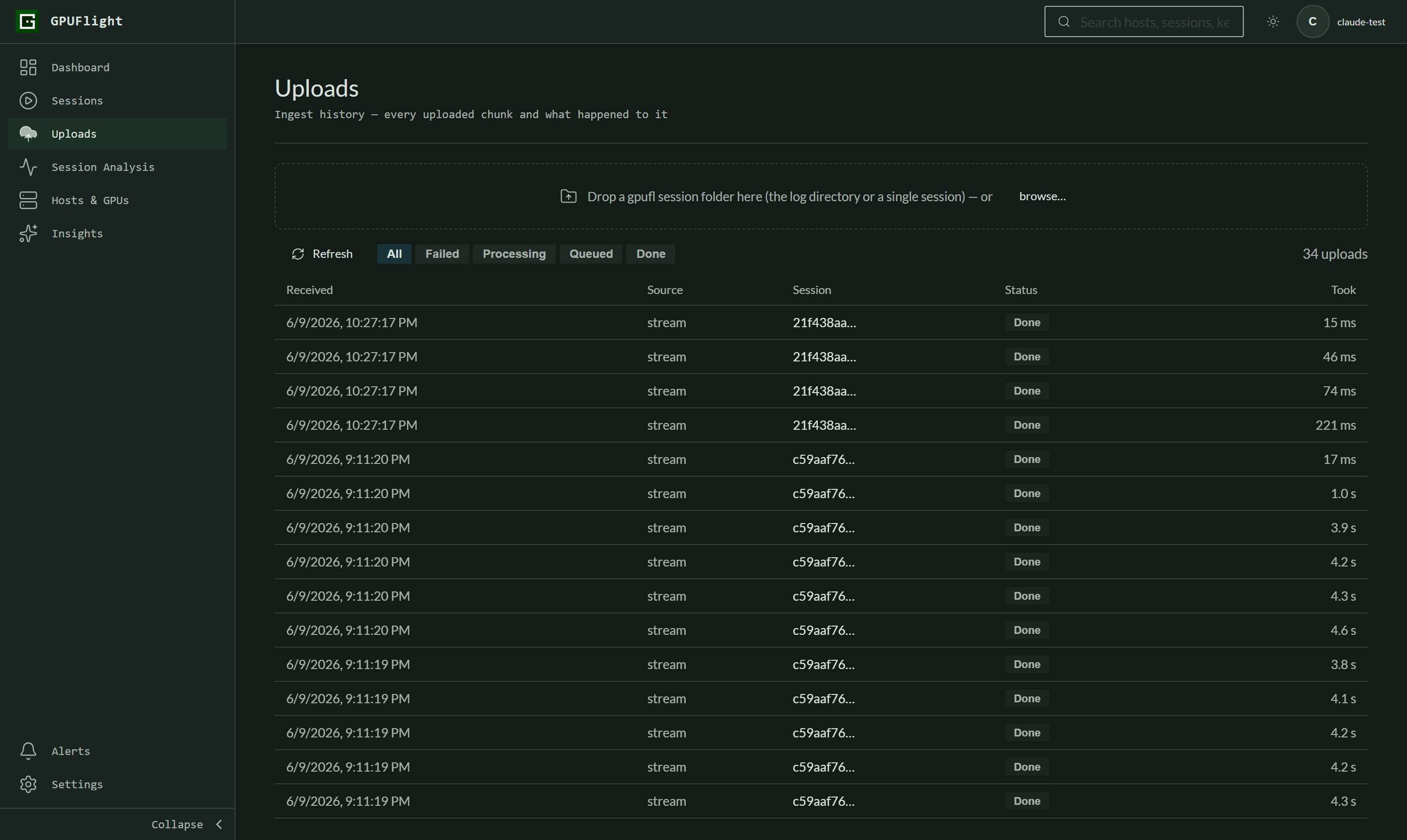
Open Uploads in the left navigation, right under Sessions. The table below the drop zone is the live ingest history — every chunk you upload shows up there with its processing status.
Step 2 — drop your session folder and review the plan
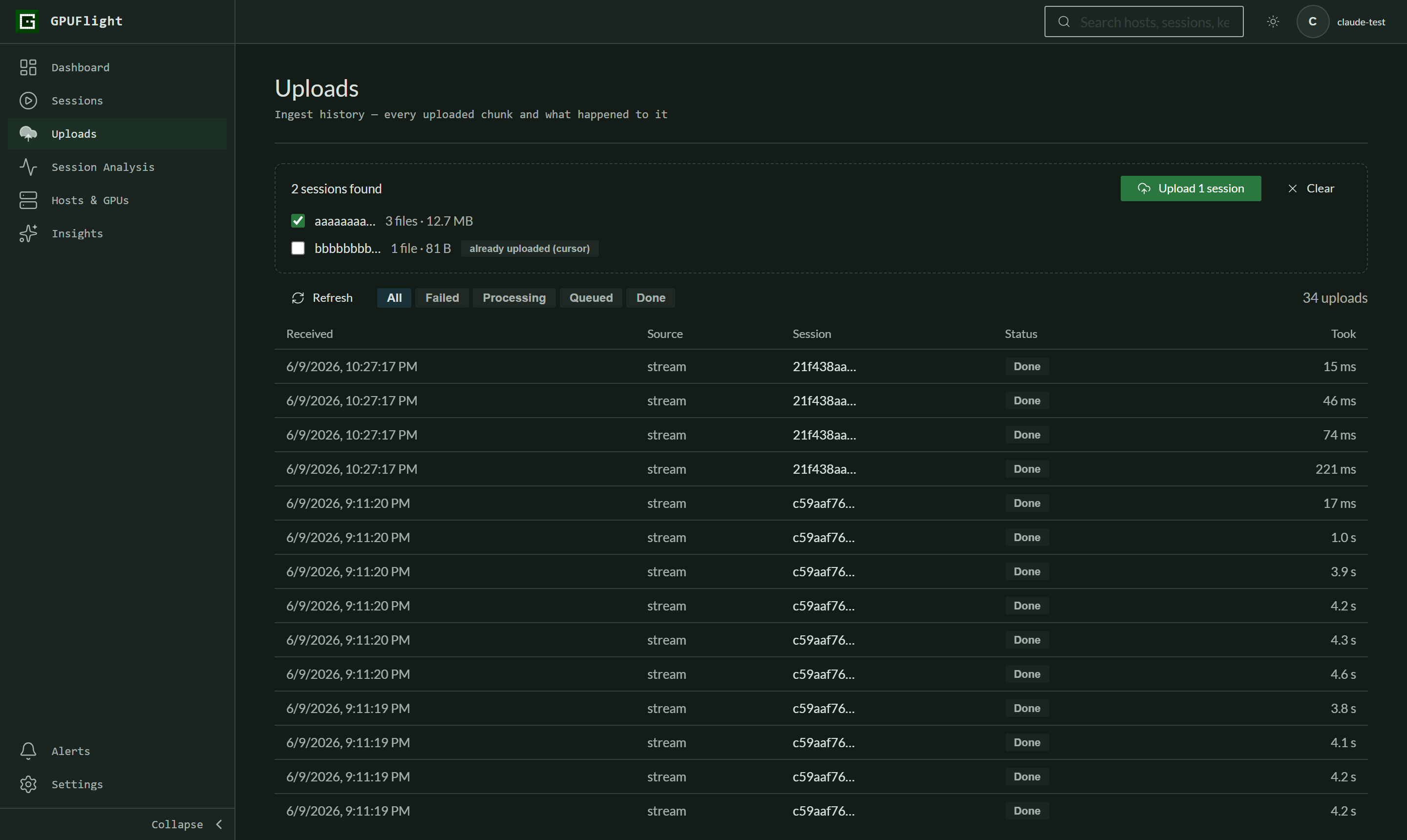
Drag the folder onto the drop zone (or click browse… and pick the directory). The plan lists every session found, with file count and total size:
- Sessions the folder's
.gpufl-upload-cursor.jsonmarks as already uploaded are unchecked by default — the "already uploaded (cursor)" badge. Tick them only if you really want to re-send. - Sessions the backend already has upload history for get an "already on server" warning. Uploading them again duplicates their events, so only do it deliberately.
- Files that aren't gpufl logs are skipped and listed, never sent.
Click Upload when the selection looks right.
Step 3 — watch it ship
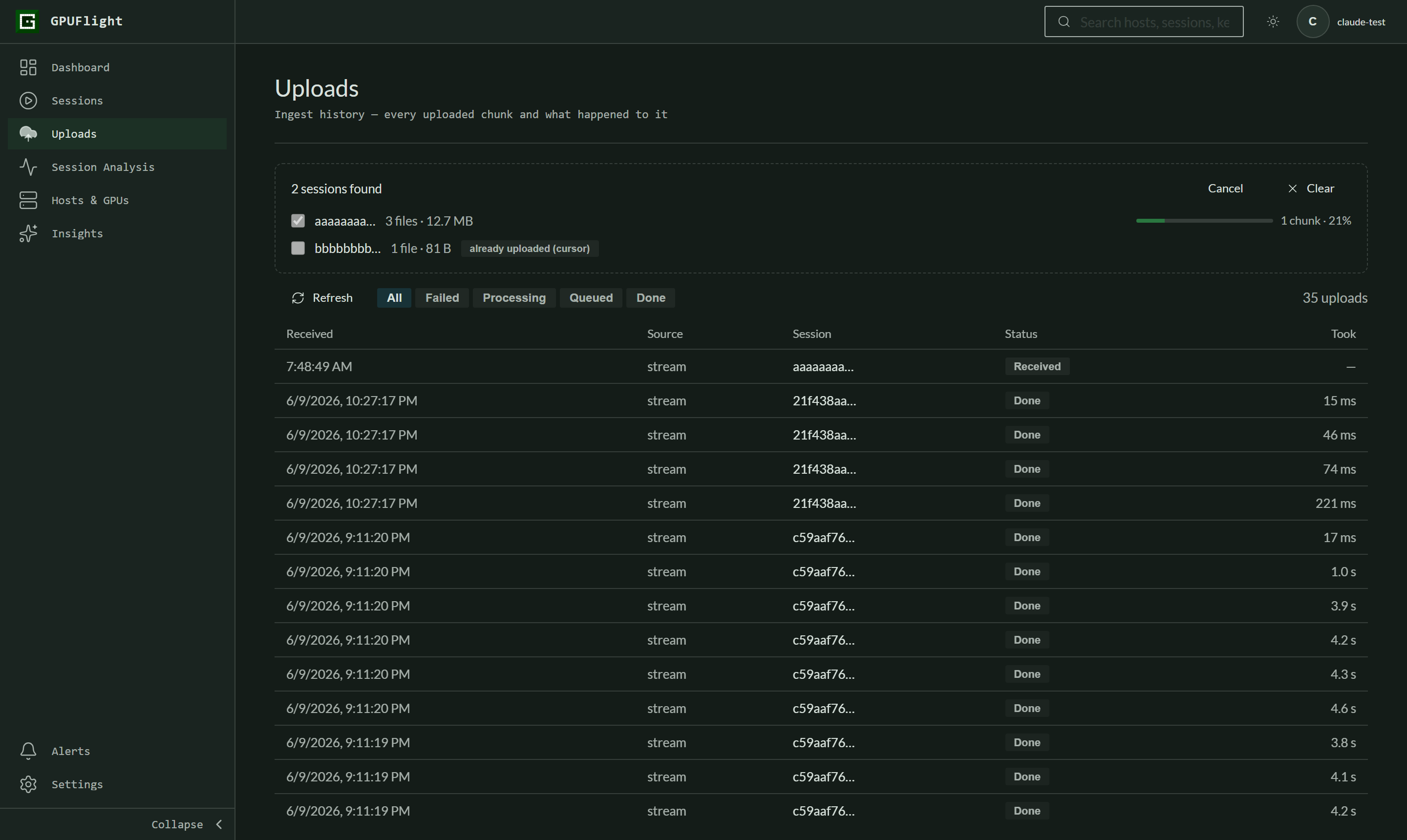
Files upload in the same order the CLI uses — rotated files
oldest-first, the active log last, shutdown events held to the very
end so the backend sees a clean session lifecycle. Each ~5 MB chunk
becomes a history row the moment the backend accepts it. Cancel
stops after the current chunk.
Step 4 — confirm in the history
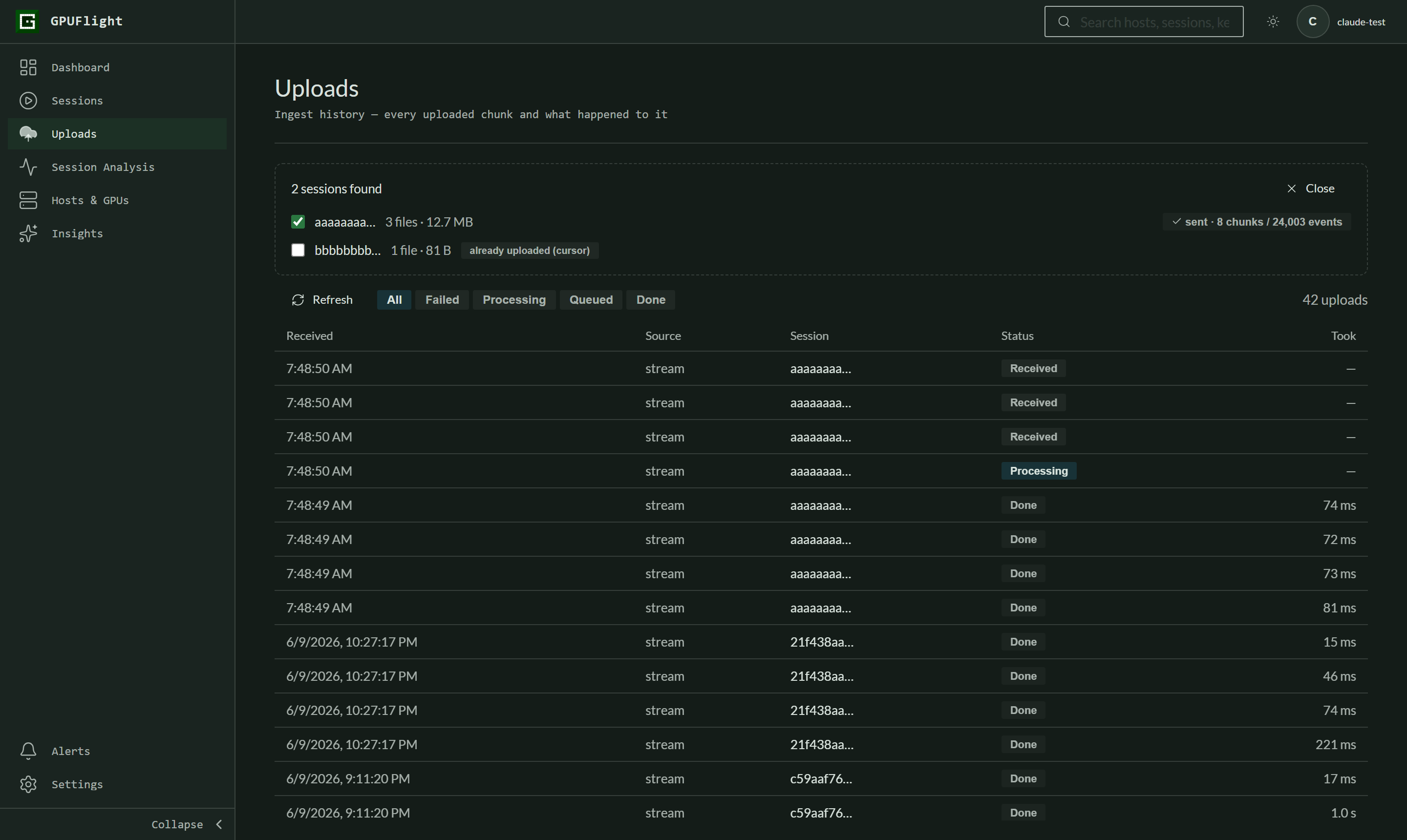
When the session shows sent · N chunks / M events, everything was accepted. The rows below drain from Received → Processing → Done as the ingest worker processes them; a Failed row expands on click with the reason. Once ingested, the session appears under Sessions like any other run.
- Browser uploads count against your workspace's monthly traffic, the same as CLI uploads.
- Chunks are gzipped in the browser via
CompressionStream— any current Chrome / Edge / Firefox 113+ / Safari 16.4+ works. - Re-uploading a session currently duplicates its events. Trust the cursor / already-on-server warnings unless you know what you're doing.